

No one likes to reinvent the wheel. And in the era of AI, none of us like to create content when we can leverage something that’s already out there. (Copyrights respected, of course.)
Actually, irrespective of AI, an aversion to unnecessary writing effort has always been a thing, especially among those of us who develop product-related content. Why rewrite a product-line description or a disclaimer when you can leverage what others (or you) have already written?
When I had my Eureka moment about this, near the turn of the millennium, I tried to create a content reuse process within an existing product documentation system. Seemed like common sense at the time. So, I set out to convince my colleagues to join me on that plain.
Today, of course, we have many options to componentize content, from WordPress to sophisticated CCMS tools. But where do you start if you’re not ready to make a giant leap to an expensive tool?
I believe the basics of my original process still apply. So, I will share it with you here.
Start with Defining Terms
In my campaign to convince my colleagues, I referred to “modular, reusable content.” A content module is a “distinct, standardized unit of content, designed for easy construction or flexible arrangement, that could be altered or replaced with minimal impact on the whole.” A Lego piece, basically.
Content modules are reusable when they can be “easily included in multiple deliverables concurrently.” Many thanks to Jack Massa and James Moran for helping me understand these basic concepts years ago.
Undergirding both definitions is the concept of independence, or self-containment. A content module carries its own meaning, context, and purpose and thus does not derive these from another source. (Conditionalized verbiage excepted, of course.)
These definitions should help you socialize what you want to do – find or create standard content modules/components that can be efficiently reused across multiple deliverables and/or channels.
Keep these definitions in mind as you begin to focus on the how.
Identify “Frequent Flyer” Content
At the time I was socializing these definitions among my colleagues, the technical communication profession was embracing the concept of single sourcing. The mantra was “Write once, reuse many times.” Many interpreted the mantra to mean reuse the same content across multiple output types – paper, downloadable (PDF), and digital (HTML).
Okay, but not what I was going for.
I wanted a single, standardized content module for each of those pesky situations that required me to include some tangential or business-level verbiage that I didn’t want to bother with. The stuff we used to call “boilerplate.”
So, I went looking for the frequent flyer content that no one wanted to own. In some cases, it was a paragraph; in others, it was a couple of pages.
I started with the lowest hanging fruit – the “you have to put this in somehow” content that stretched for about a page. I found –
- Icon definition lists
- Category definitions for warnings and cautions
- Cable and connector descriptions
- Typographical conventions (yes, we had those!)
- Safety instructions
- Preparation instructions
- Customer service resources lists
- Trademark lists
- Copyright statements
You might also find frequent flyer content as –
- Code snippets
- Troubleshooting instructions
- Product line or product type descriptions
- Legal notices and disclaimers
- User interface descriptions
You can define “frequent flyer” any way you like, by frequency of reuse, frequency of access, or some other standard. But they should be pieces of content that are distinct, substantive, self-contained, and that get combined with or referenced in many other pieces of content.
For my project, I defined frequent flyer content as frequently reused. And I soon realized that my content development colleagues…sometimes forgot one of our frequent flyers already existed somewhere and tried to reinvent it; or sometimes they copied and pasted without realizing the original was outdated; or sometimes they used a snippet when they should have used the whole.
So, my next trick was to show my colleagues that we already had some common content that we could easily standardize and reuse – and save ourselves some consistency headaches.
Embrace What’s Manageable
But first I had to look more closely at the frequent flyers themselves. Which ones were the most manageable?
My reasoning was pretty self-serving: I didn’t want to manage content that was “squirmy” – content that was constantly changing or contained too many variables. So, I created a decision tree and a set of criteria to help me (and, by extension, my team) decide what content should go into the “reusable content module” pile. The first criterion – after frequency of reuse – was manageability, which I later described as stability.
Some other criteria you might want to consider in your decision tree are –
- Level of relevance or criticality
- Need for localization or translation
- Access frequency (by users)
- Technological independence
This last bullet point was where I went next. Because my team was primarily focused on creating content for two major product lines and outputting that content primarily as user and service manuals, I saw an easy path to modularization with some product features, such as a parallel SCSI interface, that were interchangeable with others. In other words, our business-to-business customers could select one of several options for each kind of product feature (e.g., bus interface) to customize their products. We should be able to do the same to customize a user manual.
So, my primary decision point was – does the content support one of these interchangeable product features?
If the answer was yes, then we progressed to questions about how much of the feature-related content was “fixed” and how much was likely to change.
We defined content as fixed – in the category of boilerplate – if the content never changed more than what was required during an annual review. Copyright statements, which usually only required a date change annually, went into the boilerplate category. Many long-time standard feature descriptions also went into this category.
Manage the Simple Stuff but Plan for Complexities
If the potential change was minor but had some dependencies, such as a number (usually a figure reference) or a product name, we put them into another category – for content requiring simple substitutions. These minor variations could easily be conditionalized.
So, too, could content that contained one or two optional add-in paragraphs or for which we had “paired” options (choose paragraph A or B). An example is a product that always supported the SCSI-2 protocol but could also, if desired, support the SCSI-3 protocol. The paragraphs about how the product supported SCSI-3 could be added if needed.
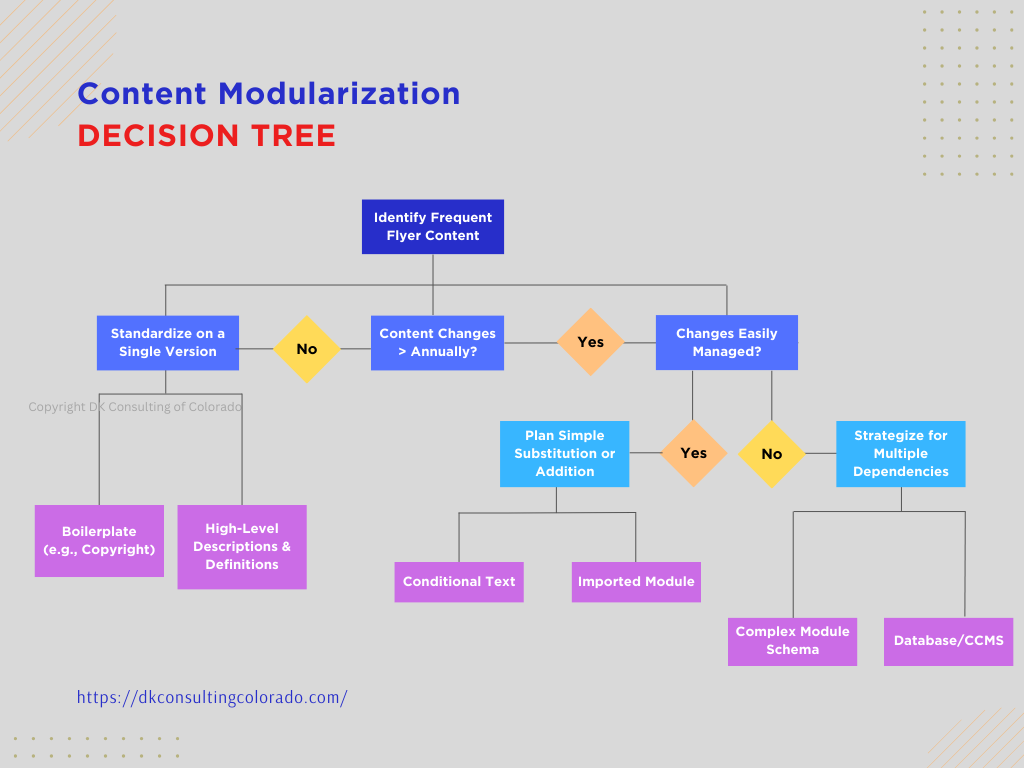
These pieces of the decision tree worked well in theory. Challenges arose (later) when we wanted to create support content for all interface protocols that a field engineer might encounter. We might want the customer to see only content about the interface they ordered (e.g., Fibre Channel). But the engineers wanted everything at their fingertips. So, we had to carefully label and construct all the interface-related content modules so that when they were combined into one big engineering book, they were distinct, clearly titled, and consistently formatted, avoiding redundancy and confusion.
Honestly, this was as far as we took the project. However, the decision tree I shared would have allowed us to move beyond simple substitution into more complex module schemes that would encompass content modules that were smaller, less dependent on the idea of “interchangeability” and more combinable, like true building blocks. That is where many database CCMS products can take us today. (Michael Andrews, for example, offers some more contemporary advice about content modules in his blog post “Best Practices for Writing Modular Content.”)
But it was a start.
Find Common Ground (the People Component)
The challenge was convincing my more experienced colleagues to make the leap from copying and pasting frequent flyer content from previous work (stored on a single computer) to reusing common, separately maintained modules (stored on a shared drive).
More than convincing them to embrace change, though change management was certainly important, the key was convincing them to let go of “ownership” of some content they had worked with for years. I previously wrote a blog post about overcoming content “ownership” among writers when I worked (later) as a content strategist. (See “The Ownership Obstacle to Content Strategy Success and 5 Ways to Handle it.”) The experiences were similar in many ways.
Humans are by nature rather territorial, particularly when we have a long-term engagement with something. We product communicators are no different. We develop familiarity with products, user expectations, concepts, and verbiage and have attained expertise – some of it hard-won – over time. So, we are reluctant to let go of control of our creations.
But we can find common ground in shared goals and sometimes even in shared pain.
Do a POC
I knew that my colleagues, like me, were tired of having to manage – with all that entails – content that was necessary but not sexy. So, with our management’s buy-in, we started there – with a Proof of Concept (POC) project that would standardize and modularize some “front matter” content to show that it could be easily and confidently reused – as is – in more than one output.
Of course, running a POC entails more than one person laboring alone, but I volunteered to do the heavy lifting. That meant that I offered to “own” the maintenance of the boilerplate (copyright verbiage, symbol descriptions, and so on) if we could also try standardizing and modularizing some of the product and interface descriptions.
Even with the boilerplate modules, we had to take several steps before producing output –
- Agree on the best existing version of the content module.
- Revise the content for the broadest applicability as well as for self-containment.
- Edit the content to the latest style standards.
- Get sign-off from the appropriate subject-matter experts.
- Ensure that the resulting module works within the limits of our current toolset.
I acted as project manager for these steps. And we did some experimental outputs along the way so that we didn’t end up with mismatched content or tool surprises. But happily, our POC worked.
Sell the Benefits
What also worked was showing – and later experiencing firsthand – the benefits of modular content. The arguments offered by experts at the time (and I quoted several to my teammates) still apply. Standardized, modular content improves productivity and efficiency in content development and, ultimately, helps build customer trust in the “truth” of a company’s content.
For the writers, the advantage of grabbing “finished” modules to include alongside their newly created ones helped increase their personal productivity while also reducing stress. Deadlines, while always daunting for writers, became a little less so. Additionally, writers and editors could free up their creative energies to focus on developing and refining more challenging content.
For management, the initial attraction was faster turnaround and fewer content-related complaints. Ultimately, our goal was to show a lower cost per completed output. (I left the company before we quite got there.)
For content strategists and designers working today with sophisticated tools and personalization goals, these small steps toward content modularization might seem trite and trivial. But for folks just getting started with content components, I hope the decision tree and our approach provide some insights.
Discover more from DK Consulting of Colorado
Subscribe to get the latest posts sent to your email.
 DK Consulting of Colorado
One thought on “Step One in Component Content: Common Modules”