

I hate to admit that I still have stumbling blocks after decades of writing experience, but, ummm, I do. It’s writing headings. There! I wrote it down—in a public blog post.
If you have the same struggle, I can share some advice and tips with you. No need to go heading-less!
Headings are important because they serve as guideposts to our written content. When effective, they help our readers locate and conceptualize the information they seek from our organizations. (Remember when I wrote about scannability?) Effective headings are especially important in online content, where they continue to feed web search engines, even Google’s.
Note that Google Search’s March 2024 core update attempts to assess a piece of content’s quality so that our search results contain fewer meaningless clickbait. This puts more pressure on content creators to develop original, helpful online content – including meaningful first- and second-level headings.
Those are strong motivators, right? So why is writing a good heading sooo hard?
Get Over Yourself; They’re Guideposts
We struggle to write effective headings because we are often too close to our content. When you take the time to write something, every word becomes a personal artifact. That kind of thinking presents a psychological barrier between us and effective labeling. We want to stuff every detail into a three-to-five-word heading – and we can’t.
Here are some tips for reducing that barrier:
- Step away from your content for a few hours. I recommend a 24-hour break.
- Ask someone else to read the content. Then, ask them to summarize the key concepts.
- Use an LLM (AI) to help you “write subheadings to be included in this content.” Two caveats:
- Be careful about loading proprietary content into an AI app.
- I’ve found that LLMs write rather wordy headings. So, plan to do some editing yourself.
- Follow the helpful tips in this blog post.
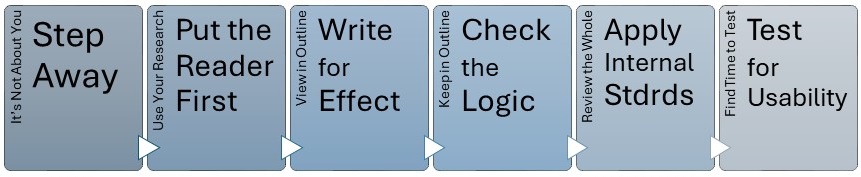
Guide Your Reader, Not Yourself
Another reason we struggle is that we fail to see our content from our reader’s point of view. Everything you’ve ever heard about researching your target audience and their pain points applies here. If you’ve done some keyword research, that’s even better. The point is to remove your writer hat and put on your reader hat.
Just as you want to assess the entire content piece from the reader’s perspective, you’ll want to pay special attention to its guideposts—your headings and subheadings. Four questions to ask up front: Do your headings and subheadings –
- Include the reader’s preferred terminology? (Here’s where keyword research and a terminology list might help.)
- Have an appropriate tone and voice?* (Leverage personas and your organization’s style guide to help ensure you stay within boundaries.)
- Guide the reader to the answer or solution they are seeking? (Examine the problem-solution section of your persona documentation to orient yourself.)
- Keep the reader oriented to the relationships among the concepts in the content piece? (More on this later.)
*Note: For more about tone and voice, review my blog post “The Secret to Voice, Tone, and Style.”
Write Effective Guideposts
After you’ve put on your reader’s hat, scrutinize the headings and subheadings you’ve written for their effectiveness. Work to ensure that they clearly reflect the key concepts of the content piece. To check that, turn your headings and subheadings into an outline. Then ask:
- How well does that outline reflect the intent of each section of your content?
- How understandable is the outline on its own?
- Is anything missing?
If your answer to the third question is yes, you should revisit your entire content piece to check that it is, indeed, complete. If it is, you might be missing a heading or two, so add them to the mix. And keep checking.
If at any point your answer to the first and second bullet is no (or perhaps with a head scratch), here are some ways to improve the effectiveness of your headings and subheadings:
- Use multiple words. One-word headings (e.g., “Overview”) are unhelpful. Three to five words is a good length.
- Place important words first. If those words are action words (verbs), all the better.
- Use the most specific words you can without being obscure.
- Leverage keywords where appropriate.
- Avoid ambiguous words, especially words with double meanings.
- Avoid starting with an article like “The” or “A” unless the distinction is important.
- Avoid repeating the same heading or subheading.
A note about templatized content: If you are writing in a pre-designed template with inflexible headings such as “Problem” and “Solution,” attend carefully to two critical areas of your work:
- The title of the content piece must expressly state its purpose and/or the problem to be solved. And yes, you might have to break the five-word rule to accomplish this goal. An example is “How to Unlock Your Text Files When the Repository Is Full.”
- The opening sentence for each of the pre-configured sections must be clear and specific. Here’s an example:
If you receive a ‘Repository Full’ message (message 5825 or 5965), you can unlock the repository’s text files as a repository administrator. Follow these steps:
Capture Logical Relationships in Your Guideposts
With your headings and subheadings still in outline format, you’ll also want to check their logic by examining their relationships. The goal is to ensure that your headings and subheadings work for—not against—the content’s purpose and the reader’s goal.
Check the Logical Pattern
A key question to ask is, “What kind of logical progression do my headings reflect?” (Of course, also ask, “Does my content also reflect this progression?”) Here are some possible logic patterns for your headings:
- Problem to solution
- Chronological (From historical to current or from current to historical and back)
- General to specific (Example: move from search engines to Google)
- Specific to general (Example: move from ChatGPT features to all LLMs)
- Known to unknown or familiar to unfamiliar (Example: move from describing our galaxy to describing black holes)
- Growth or Progression (From start to finish or from finish to how I got here)
- Step 1 to step XX
- Whole to parts (A “breakdown” of a large concept into smaller ones) or parts to completed vision
- Lists explained (a favorite of bloggers)
Even if your content breaks a large concept into smaller ones, your headings should reflect the relationship among those concepts. Two techniques are essential to achieving your logic goals: parallelism and hierarchy.
Follow These Tips
Achieving parallelism means that you maintain the same grammatical pattern for each heading at a given level (for example, all H1s). The main headings in this blog post are examples. Each heading starts with a verb (“Capture”) followed by a noun phrase (“Logical Relationships”). Starting headings with verbs is easy and speaks directly to the reader. However, any parallel structure you choose contributes to the cohesion and readability of your work, giving it a professional polish.
Using a hierarchical structure across your heading also boosts readability and, most importantly, accessibility. As I mentioned in my recent blog post, “Neurodivergence and Content Design: The Migraine Edition,” using hierarchy and pattern in content assists people with cognitive and learning disabilities to stay oriented. Your goal is to help them progress through your content in ways that do not rely on memory.
The guideline for hierarchical headings is to always subdivide a section into at least two parts. In other words, if you use H2s in a section, you should always have at least two. Also, many style guides recommend that you limit hierarchical headings to the H3 level. If you have levels below that, you should consider restructuring your content. (Note that effective headings, especially hierarchical headings, rely on your ability to chunk your content successfully. More on chunking in my blog post “Chunking for More Accessible Online Content.”)
Hierarchical headings should allow your readers to scan your content successfully. Here is an example of hierarchical headings from a technical user manual I wrote a long time ago:
- Troubleshooting
- Preliminary Checklist
- Check First
- Checks with the Unit Powered Off
- Checks with the Unit Powered On
- Checks if the Output Does Not Turn On
- Error Codes
- Error Codes Troubleshooting Table
- Error E81 Fault Vectors
- Preliminary Checklist
It is not perfect, but hopefully, readers scanning these headings can quickly recognize the progression they must follow to troubleshoot this piece of hardware. Back then, I missed that readers of English as a second language can sometimes stumble over gerunds (examples: Troubleshooting, Checking, Connecting). So, avoid them in headings if you can.
Follow Your Org’s Guidepost Conventions
Not everyone writes headings for a printed user manual. In fact, many of us these days write content modules for a CCMS or LMS. In any case, you should always follow your organization’s conventions.
Often, these conventions focus more on mechanical elements of heading, such as capitalization and the number of words allowed. But, if you’re lucky, your organization has a robust style guide that includes examples of acceptable and unacceptable headings. I was fortunate enough to have one such guide when I worked at Sun Microsystems. That guide, published externally as “Read Me First! A Style Guide for the Computer Industry,” still offers helpful tips and examples. (Full transparency: I helped write a chapter for that guide’s third edition.)
If you write content modules, your organization’s style guide might not stress hierarchy in headings. However, since you are writing building blocks that will be assembled for a target audience, you must still write headings with the reader in mind. Here are some tips:
- Ensure Consistency: Standardize within module types. If you use DITA or some other semantic markup or ontology that categorizes content (for example, “concept” and “tasks”), ensure that you apply the same approach to all headings within the same class or type. Include consistency of tone and voice, too. You might consider using a terminology list to assist with consistency.
- Account for Variability and Scalability: Keep the big picture in mind, but write headings for the context within the module, not for some external context. Avoid assumptions about how the content module might be used and avoid wording that might limit reuse.
- Optimize for Reusability: Run checks for your headings’ relevance within different external contexts. Even if you do this as a mental exercise, check that your headings work if the same module is used in various outputs: training courses and informational brochures, for example.
Test Your Guideposts with Users
In your organization, final checks of headings might also include some user testing. One popular method is A/B testing.
A/B testing, or split testing, asks the user to choose from two versions of something. Web designers and creators of online content use this testing method to determine which of the choices performs better against a specific goal, such as click-through rates, conversion rates, or engagement metrics. The method can be formal (involving a formal test plan) or informal.
A similar type of testing is multivariate testing, which allows you to test multiple versions of a set of headings and subheadings. You might vary the keywords from set to set or try different structures. The goal is to determine which combination of elements performs the best.
More formal usability testing, such as protocol tests and reader interviews, can help you improve the entirety of your content. Web-specific technologies, such as click maps and heatmaps, can help you assess which sections (and section headings) generate the most user attention.
Such testing might be overkill for small, temporary projects. However, getting someone else’s feedback on your headings can help you refine and revise. Lisa D. Gay’s article “Let your Users Teach You: Document Quality and Usability Testing,” in STC’s Intercom magazine Features pages, offers tips on simple document usability testing and its benefits.
What tips do you have for writing effective headings?
Discover more from DK Consulting of Colorado
Subscribe to get the latest posts sent to your email.
 DK Consulting of Colorado
2 thoughts on “6 Strategies for Writing Compelling Headings”